- Swift 98.4%
- Makefile 0.6%
- Shell 0.6%
- Python 0.4%
 d72f2c40c6 Co-Authored-By: Claude Opus 5.5 <noreply@anthropic.com> Claude-Session: https://claude.ai/code/session_0176CU4ZeGKwGMgDWWwZ7gVh |
||
|---|---|---|
| .claude/commands | ||
| .githooks | ||
| .github | ||
| docs | ||
| MacTorn | ||
| Plans | ||
| scripts | ||
| .gitattributes | ||
| .gitignore | ||
| .gitleaks.toml | ||
| app_dark_1.png | ||
| app_light_1.png | ||
| AUDIT_REPORT.md | ||
| CHANGELOG.md | ||
| CHANGELOG_AGENT.md | ||
| IMPLEMENTATION_BACKLOG.md | ||
| ISA.md | ||
| LICENSE | ||
| Makefile | ||
| OPTIMIZATION_ANALYSIS.md | ||
| QA_ACCESSIBILITY_SYSTEM_REPORT.md | ||
| QUALITY_AUDIT_2026-09-30.md | ||
| README.md | ||
| SECURITY.md | ||
| SECURITY_AUDIT.md | ||
| UX_RECOMMENDATIONS.md | ||
MacTorn
Native, privacy-conscious macOS menu bar companion for Torn. See live account state, upcoming timers, travel, faction activity, market prices, and forum updates without keeping the game open.





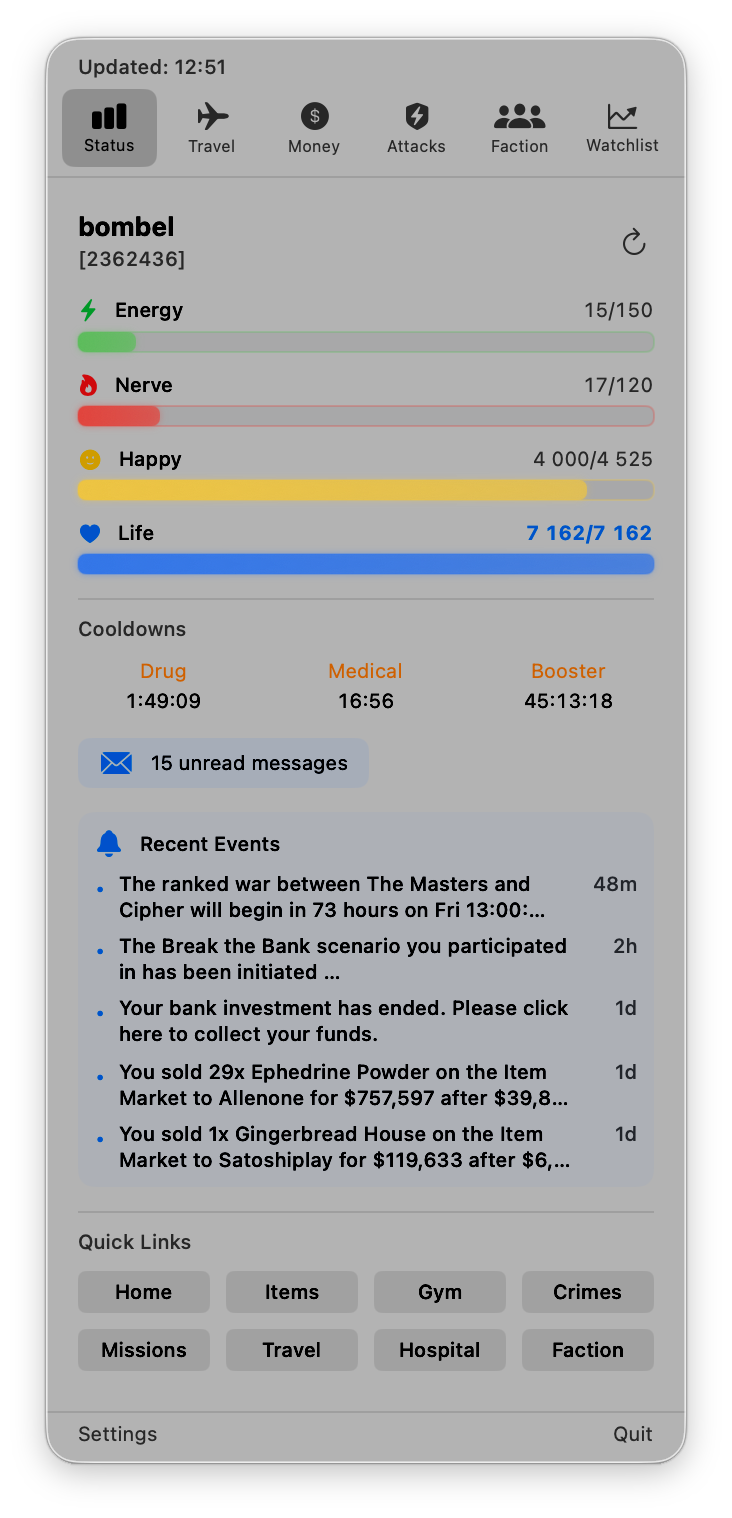
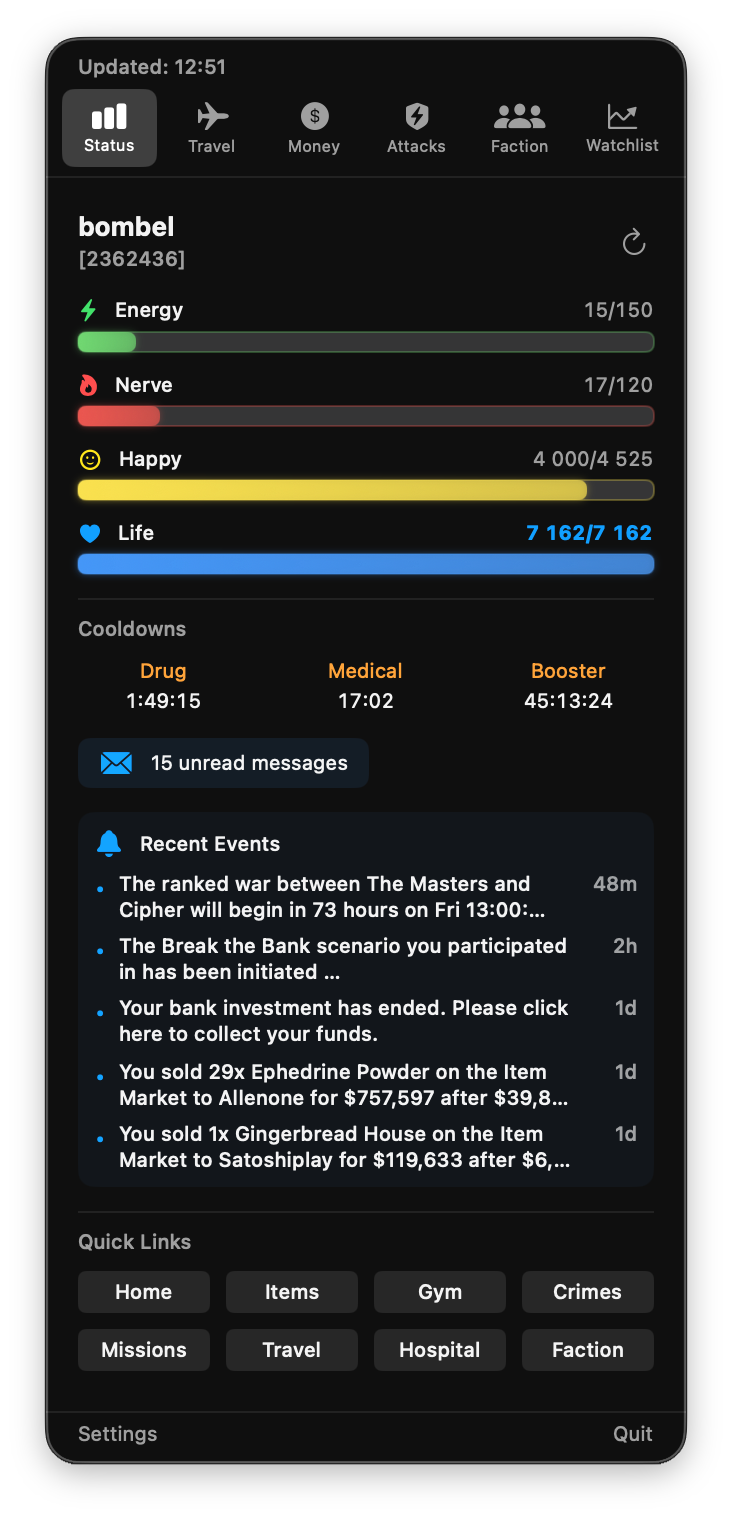
Highlights
- Always-visible state: the menu bar shows travel, hospital, jail, or the next cooldown as a live countdown.
- Nine focused modules: Status, Travel, Attacks, Money, Properties, Stocks, Faction, Watchlist, and Forums, each one click away on an icon rail in a compact 360 pt panel.
- Built around the countdown: Status lists what is ready now and everything that is counting down, soonest first, in one timeline; colour means state and nothing else.
- Actionable notifications: bar thresholds, cooldowns, landing, release, chain expiry, Organized Crime readiness, virus completion, bounties, item prices, forum posts and threads, and app updates.
- Budget-aware polling: fast point-in-time data stays separate from throttled, row-based feeds, and MacTorn reads your key's permissions to skip requests that cannot return anything. Live request and row budgets in Diagnostics.
- Read-only by design: MacTorn displays Torn data and opens Torn pages; it never performs game actions through the API.
- Local-first security: the API key lives in macOS Keychain, the app is sandboxed, logs and diagnostics are redacted, and crash reporting is opt-in.
Features
Now
- Status: Energy, Nerve, Happy, and Life; "Ready now" actions for finished cooldowns, refills and stock bonuses; the "Next up" timeline of bars, cooldowns, landing, hospital/jail release, education, Organized Crime, virus programming and the chain; bounties; waiting messages, events, awards and competitions; recent events; and eight Torn quick links.
- Travel: the landing countdown with departure and arrival times, flight times to all 11 destinations for standard and Private Island airstrip travel, pre-arrival alerts, and travel links.
- Attacks: battle stats, total battle stat score, and recent attack outcomes with direct links to relevant Torn pages.
Account
- Money: cash, vault, Cayman, points, tokens, tracked total, and common money actions.
- Properties: market value, cost, happy, ownership/rental state, and rental expiry.
- Stocks: scrollable holdings with names, acronyms, market value, and cost basis.
- Faction: faction and chain state, the player's Organized Crime 2.0 status, active ranked war progress, recent faction news, and armory shortcuts.
Watch
- Watchlist: search Torn's item catalog by name (or paste an ID), API v2 item-market prices, quantity at the lowest price, price changes, threshold alerts, inline validation, and undo for destructive changes. Torn publishes item-market data to every API user at least an hour late and updates it hourly, so prices and alerts follow that schedule rather than the live market.
- Forums: watch individual threads by URL/ID for new posts, or watch a whole category for new threads, with per-thread notification control and 2/3/5-minute polling options.
Desktop widgets
Three WidgetKit widgets are included for macOS 14+: Player Status (small/medium), What's Next? (medium/large, 3/5 upcoming events), and Travel (small/medium). They show the last snapshot supplied by the running MacTorn app; they do not call Torn or store the API key. Known deadlines use system countdowns with server clock correction. Data older than five minutes is marked Out of date; estimated landing is not treated as confirmation of arrival. Clicking a widget opens the Status or Travel view.
Signing requirement: the existing ad-hoc build can compile and embed the widgets, but cannot authorize their shared App Group. It displays a signing setup message. To use widgets with real data, build both targets with a valid Apple signing identity:
make build-widgets DEVELOPMENT_TEAM=YOUR_TEAM_ID WIDGET_SIGN_IDENTITY="Apple Development"
This uses the macOS-only TEAM_ID.com.mactorn.widgets group in both targets. It does
not require registering a group. identifier or uploading anything to Apple. An
installed signing certificate for that team is required. Install the resulting app,
launch and connect MacTorn, then right-click the desktop, choose Edit Widgets, and
search for MacTorn. Keep MacTorn running for fresh data; macOS controls refresh timing.
Quality of life
- Automatic update checks against GitHub Releases.
- Launch at Login, preferred-browser selection, light/dark/system appearance, and configurable main polling (15/30/60/120 seconds).
- Explicit loading, stale-data, empty, permission, error, and retry states that keep the last good snapshot visible when an optional endpoint fails.
- Account-scoped state: changing the API key cancels in-flight work and clears data, alerts, and pending state from the previous account.
Installation
- Download the DMG from the latest release.
- Open it and drag MacTorn.app to Applications.
- Right-click MacTorn and choose Open on first launch.
- Enter a Torn API key, then use Test Connection to confirm its access.
Requirements
- macOS 14 Sonoma or later.
- Intel (
x86_64) or Apple Silicon (arm64) Mac. - A Limited Access (or higher) Torn API key for every module. A Custom key can be used, and Test Connection reports which features its selections unlock.
Why macOS shows a warning
Public builds are universal and ad-hoc signed, but they are not notarized with a paid Apple Developer ID. Gatekeeper therefore cannot identify the publisher. Right-clicking the app and choosing Open is the expected first-launch flow for this distribution model.
Verify the download
When the release notes include a SHA-256 checksum, compare it with the downloaded DMG:
shasum -a 256 ~/Downloads/MacTorn.dmg
The value must exactly match the checksum in the release notes. This detects a changed or corrupted artifact; it does not replace Apple notarization.
Privacy and security
- The Torn API key is stored as a generic password in macOS Keychain and is migrated away from legacy plaintext preferences automatically.
- Full Torn account snapshots remain in memory. Signed widget builds additionally save a minimal local display snapshot (bars, status, destination and timer deadlines) in the shared App Group. It contains no API key, money, messages or account identifier, and is cleared at app startup and when the account is reset or changed.
- The App Sandbox grants only outbound network access, and Hardened Runtime is enabled.
- Request URLs, logs, notifications, and copied diagnostics are sanitized to avoid exposing keys or Torn PII.
- Sentry crash reporting is off by default. If enabled, performance tracing, session replay, default PII, network breadcrumbs, and failed-request capture remain disabled; URLs are redacted before an event can be sent.
- Update checks contact GitHub Releases, but do not include Torn account data.
See SECURITY.md for the supported-version policy, threat model summary, and private vulnerability-reporting channel.
Accessibility and keyboard control
MacTorn follows system Reduce Transparency, Reduce Motion, Increase Contrast, and light/dark appearance settings. Its status surfaces expose semantic VoiceOver labels, including live menu bar state, progress values, financial rows, attacks, events, chain, and status badges. Every colour is opaque, so Reduce Transparency only affects the backdrop behind a prompt. Long modules remain scrollable in the fixed-size panel.
Keyboard commands are available from the … menu at the bottom of the rail and from the app's Commands menu:
| Shortcut | Action |
|---|---|
⌘R |
Refresh |
⌘, |
Settings |
⌘1 … ⌘9 |
Status, Travel, Attacks, Money, Properties, Stocks, Faction, Watchlist, Forums |
Esc |
Leave Settings / return to the current module |
Automated accessibility and compact-window regressions run in CI. Manual validation with every macOS assistive setting remains an ongoing release-quality activity; see IMPLEMENTATION_BACKLOG.md for the explicit test matrix.
Optional Torn API v2 tools
Enable each module in Settings › Modules; it then appears inside its tab. Notifications are separately opt-in, per module:
- Faction: open OC slots at or above a minimum pass rate (set in Settings), plus on-demand ranked-war, raid, territory, completed-chain and dirty-bomb history with older-page loading.
- Stocks: v2 holdings, fractional cost basis, bonus progress and ready alerts. Enabling this replaces stock holdings in the fast v1 poll; ready bonuses also appear under "Ready now" on Status.
- Status: current competition (Elimination, Rock Paper Scissors, Halloween, Easter Egg Hunt), Elimination team standings, remaining players and attacks during the last completed minute, plus the Torn calendar: running and upcoming events. Team data is requested only during Elimination.
- Money: active trades, change alerts and on-demand offered-item details.
- Travel: a shop-price lookup by item name or country, compared with catalog or last-known watchlist prices. It opens on the country you are flying to or standing in. Prices do not guarantee live shop inventory or profit.
Modules preserve the last successful data with its checked time and error message on failures. Account changes discard responses and alert baselines. Initial loads do not send a burst of notifications. Private module responses stay in memory; only module preferences and the public weekly item/shop catalog are persisted. Optional request permissions are visible in API Data Usage.
API Data Usage
MacTorn's typed endpoint registry in
MacTorn/Networking/TornEndpoint.swift
is the source of truth for request construction, Diagnostics, and the table below. A test
compares this table against what the registry generates, character for character.
Point-in-time data (bars, money, cooldowns) can be polled frequently. Row-based data (events, attacks, news, forum posts) counts against Torn's per-category daily row limit, so MacTorn throttles and hard-limits those calls. A daily row-limit error pauses only the affected feed; core live data continues updating.
Two selections MacTorn reads are globally cached by Torn: every key gets the same snapshot and no request can get a newer one. Since 11 November 2026 item-market listings are cached for an hour and bounties for five minutes. MacTorn asks for a watched item again only once Torn can have a newer snapshot. It does not read bazaars, market property or rental listings, or the company directory, and its hard ceiling of 60 requests a minute sits far below Torn's 100 per user and 5,000 per IP address.
MacTorn reads your key's own permissions from /key/info and skips what it cannot use.
A Public-Only key is never asked for battle stats. If you have no faction, MacTorn stops
asking for faction data. And when a request names several selections, MacTorn trims it to
the ones your key can read, so one forbidden selection no longer fails the whole call.
Every request carries comment=MacTorn, so you can pick its traffic out of your key log
at torn.com. API v2 requests send the key
in an Authorization header instead of the URL.
| Endpoint | API | Selections | Data | Cadence | Rows/call | Budget | Critical | Purpose |
|---|---|---|---|---|---|---|---|---|
| User (fast poll) | v1 | basic, bars, cooldowns, travel, profile, money, battlestats, properties, stocks | point-in-time | Every refresh interval (default 30s; 15s aggressive) | — | core | yes | Live Energy/Nerve/Happy/Life bars, drug/medical/booster cooldowns, travel status, money & net worth, battle stats, properties and stock holdings. |
| User v2 (combined) | v2 | organizedcrime, refills, education, bounties, notifications | point-in-time | Every refresh interval (rides the fast poll) | — | core | no | Own Organized Crime 2.0 status, daily refills remaining, in-progress education timer, bounties placed on you, and the unread message/event/award/competition counters. |
| Virus programming | v2 | — | point-in-time | On demand; re-read once the known finish time has passed, at least 30 min apart | — | core | no | The virus currently being written and the moment it finishes, for the countdown and the ready alert. |
| User activity | v1 | events, attacks | row-based | ≥5 min (self-throttled; hard row limit) | 25 | activity | no | Events feed and recent attacks (display-only). The unread message count now comes from the point-in-time notifications selection, which costs no rows. |
| Faction basic + chain | v1 | basic, chain | point-in-time | Every refresh interval (rides the fast poll) | — | faction | no | Faction identity and the live chain counter/timeout that drives the chain-expiring alert. |
| Faction ranked wars | v2 | — | point-in-time | ≥5 min (throttled; large, slow-changing payload) | — | faction | no | Active ranked war progress (your faction vs. the opponent). |
| Faction news | v2 | — | row-based | ≥5 min (throttled; hard row limit) | 25 | faction | no | Recent faction news feed. |
| Item market | v2 | — | point-in-time | Per item, once Torn's hourly cache can have changed (watchlist refresh + price-alert timer) | — | market | no | Lowest item-market listings for each watchlist item, used to drive price alerts. Globally cached by Torn for an hour. |
| Stock metadata | v1 | stocks | point-in-time | Rarely (cached; refreshed on demand) | — | metadata | no | Global stock names/acronyms used to label the user's stock holdings (slow-changing reference data). |
| Item catalog | v2 | — | point-in-time | Rarely (cached for a week; refreshed on demand) | — | metadata | no | Names for every Torn item, so the watchlist can be searched by name and priced items are labelled rather than numbered. |
| Forum thread | v2 | — | point-in-time | Forum poll (opt-in feature) | — | forum | no | Post count of a watched forum thread, to alert on new replies. |
| Forum category threads | v2 | — | row-based | Forum poll (opt-in feature) | 20 | forum | no | Thread list of a watched forum category, to alert on new threads. |
| Key info | v2 | — | point-in-time | On demand (Test Connection / key change) | — | core | no | One-off validation of the API key: its access level/type, the owner's ID, and which selections it can read, for onboarding's Test Connection. Never polled. |
| Open OC slots | v2 | — | point-in-time | Opt-in; at least 300s between background reads | — | core | no | Recruiting crimes and empty roles matching your CPR filter. |
| Stock bonuses | v2 | — | point-in-time | Opt-in; at least 300s between background reads | — | core | no | Holdings, cost basis and collectible stock bonuses. |
| Stock prices and benefits | v2 | — | point-in-time | Opt-in; at least 300s between background reads | — | metadata | no | Stock names, prices and benefit requirements. |
| Current competition | v2 | — | point-in-time | Opt-in; at least 60s between background reads | — | core | no | Current event and your team, score and attacks. |
| Elimination teams | v2 | — | point-in-time | Opt-in; at least 60s between background reads | — | core | no | Team standings and attacks in the last completed minute; only during Elimination. |
| Torn calendar | v2 | — | point-in-time | Opt-in; at least 21600s between background reads | — | metadata | no | Upcoming and running competitions and events. |
| Your calendar start time | v2 | — | point-in-time | Opt-in; at least 21600s between background reads | — | core | no | Your personal start time for non-fixed events; optional. |
| Active trades | v2 | — | point-in-time | Opt-in; at least 120s between background reads | — | core | no | Ongoing exchanges and change alerts. |
| Trade details | v2 | — | point-in-time | Opt-in; at least 30s between background reads | — | core | no | Items offered by each participant in a trade; loaded on demand. |
| Ranked wars | v2 | — | row-based | On demand | 20 | faction | no | Conflict history, loaded on demand with bounded pages. |
| Raids | v2 | — | row-based | On demand | 20 | faction | no | Conflict history, loaded on demand with bounded pages. |
| Territory wars | v2 | — | row-based | On demand | 20 | faction | no | Conflict history, loaded on demand with bounded pages. |
| Completed chains | v2 | — | row-based | On demand | 20 | faction | no | Conflict history, loaded on demand with bounded pages. |
| Dirty bombs | v2 | — | point-in-time | On demand | — | faction | no | Conflict history, loaded on demand with bounded pages. |
All of these requests are read-only. MacTorn does not use the Torn API to submit game actions.
Development
The project is a native SwiftUI MenuBarExtra app targeting macOS 14. CI builds with
Xcode 16.4, which is the reference toolchain for reproducible local results.
git clone https://github.com/pawelorzech/MacTorn.git
cd MacTorn
make build
Open the project in Xcode with make open, or directly open
MacTorn/MacTorn.xcodeproj.
Common commands
| Command | Purpose |
|---|---|
make test |
Unit tests |
make test-ui |
Hermetic fixture-driven UI tests |
make test-all |
Unit and UI tests |
make coverage-gate |
Unit coverage plus the 80% critical-module gate |
make analyze |
Xcode static analysis |
make build |
Debug build |
make release |
Universal, strict ad-hoc Release build for local use |
make verify-release |
Verify arm64/x86_64 slices and ad-hoc signature |
make scan |
Scan Git history for secrets with gitleaks |
Code signing is disabled for normal local builds and tests. make release deliberately
uses strict ad-hoc signing; make release-signed DEVELOPER_ID="…" is available for a
Developer ID workflow.
Architecture
MacTornApp / ContentView (module rail + header + one view per tab, built from Views/Design)
└── AppState (@MainActor facade)
    ├── TornRequester             The one request pipeline: gate, budget, health, throttle
    ├── PlayerState               Torn data for the signed-in account
    ├── AccountSessionStore       Keychain-backed account boundary
    ├── UserSnapshotService       Core user snapshots and validation
    ├── FactionStore              Faction, chain, wars, and news
    ├── MarketWatchService        Item prices and price alerts
    ├── ForumWatchService         Watched threads and update detection
    ├── PollingCoordinator        Request and row budgets
    └── NotificationCoordinator   Persistent notification deduplication
Networking is injected through the NetworkSession protocol. Unit tests use routed
fixtures and isolated preferences; the DEBUG-only UI harness uses an in-memory Keychain,
fake networking, and controllable connectivity, so CI never reads a developer's real
Torn account.
CI runs unit tests and coverage, fixture UI tests, static analysis, and a verified universal ad-hoc Release build. Swift Package Manager currently resolves Sentry Cocoa as the only third-party runtime dependency.
Documentation and support
- Changelog
- Security policy
- Implementation status and remaining QA matrix
- Project wiki
- Torn community thread
If MacTorn is useful to you, you can support bombel [2362436] in Torn.
License
MacTorn is available under the MIT License.
Made with ⚡ for the Torn community.